R&D / uMaGeR
ONE TOUCH TO ACQUIRE

uMaGeR

Forensic Imaging and Triage for the Investigation Scene

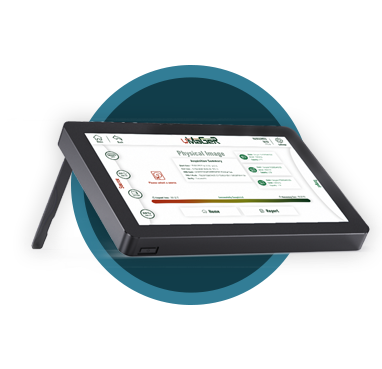
We don't just copy digital evidence; we report the first findings of an incident without going to the lab. Image a write-protected source with one touch and examine it at the scene with the DFIR, e-Discovery and Mobile Device modules.

1:3
One Source, Three Targets
3
Investigation Modules
uMaGeR
uMaGeR logo

Under Everything, a Solid Imaging Engine

The modules build on a copy you can trust. Imaging is done by an engine proven on real hardware.

Write-Protected Source

The source is opened read-only; evidence is never written, under any condition.

E01 · Ex01 · DD · L01 · Clone

The image format you need: physical, logical, clone or clone + image.

MD5 · SHA-1 · SHA-256 · SHA-512

Targets are verified by reading back and comparing hashes.

1:1, 1:2, 1:3 Imaging

Image one source to one, two or three targets at the same time.

HPA/DCO and Disk Encryption Detection

Warns about hidden areas and encrypted volumes.

Automatic Acquisition Record

Every acquisition is documented with a hash-chained audit log.

Three Modules That Speed Up the Investigation

Three sections built on top of imaging. Each one runs at the scene with one touch on the device's touchscreen.

01 / 03

DFIR

Fast triage at the scene

  • Windows · Linux · macOS
  • YARA · Sigma · IOC
  • MITRE ATT&CK
  • Timeline
02 / 03

e-Discovery

Index once, search instantly

  • Advanced filtering
  • OCR
  • Keyword · regex search
  • NTFS · ext · APFS · HFS+
03 / 03

Mobile Device

Plug in, copy, report

  • Android · iOS
  • Instant message records
  • Advanced location analysis
  • Deleted records

Three Steps, One Touch

Start the work that runs from the scene to the lab in the field, and finish it there too.

1

Acquire

Connect the source write-protected and image it to one, two or three targets at the same time.

2

Examine

Pull the first findings with the DFIR, e-Discovery or Mobile Device module without going to the lab.

3

Report

An automatic acquisition record and a report that opens in any browser are ready on the target drive, with findings, events and the integrity log.

From red to green: the source stays untouched, the target is verified.

Technical Specifications

Acquisition Modes Physical · Logical · Clone · Clone + Image · Restore
Image Formats E01 · Ex01 · DD · L01 · Clone
Targets 1:1 · 1:2 · 1:3
Hash Verification MD5 · SHA-1 · SHA-256 · SHA-512 (read-back)
Source Protection Write-protected · read-only
Detection HPA / DCO · disk encryption
File Systems NTFS · ext · APFS · HFS+
Mobile Android · iOS
Reporting Browser-viewable report · hash-chained audit log
Interface Touchscreen

Use Cases

Investigation Scene

Copy evidence write-protected and report the first findings at the scene, without going to the lab.

Cyber Incident Response

Use the DFIR module to scan Windows, Linux and macOS systems with YARA, Sigma and IOCs, and lay out findings with MITRE ATT&CK and a timeline.

e-Discovery and Legal Review

Index the image once and find relevant documents instantly with OCR, keyword and regex search.

Mobile Device Examination

Extract and report instant messages, locations and deleted records from Android and iOS devices.

Full details at umager.com

Modules, screenshots and workflow details are on the product site.

Visit umager.com

Related Products

Get a Quote for uMaGeR

The first findings at the scene, without going to the lab. Contact our team for a demo and technical details.